Upgrade, manage billing, and cancel
Everything subscription-related lives on the Settings screen. Payments are processed by Stripe; OuttaScope never sees or stores your card number.
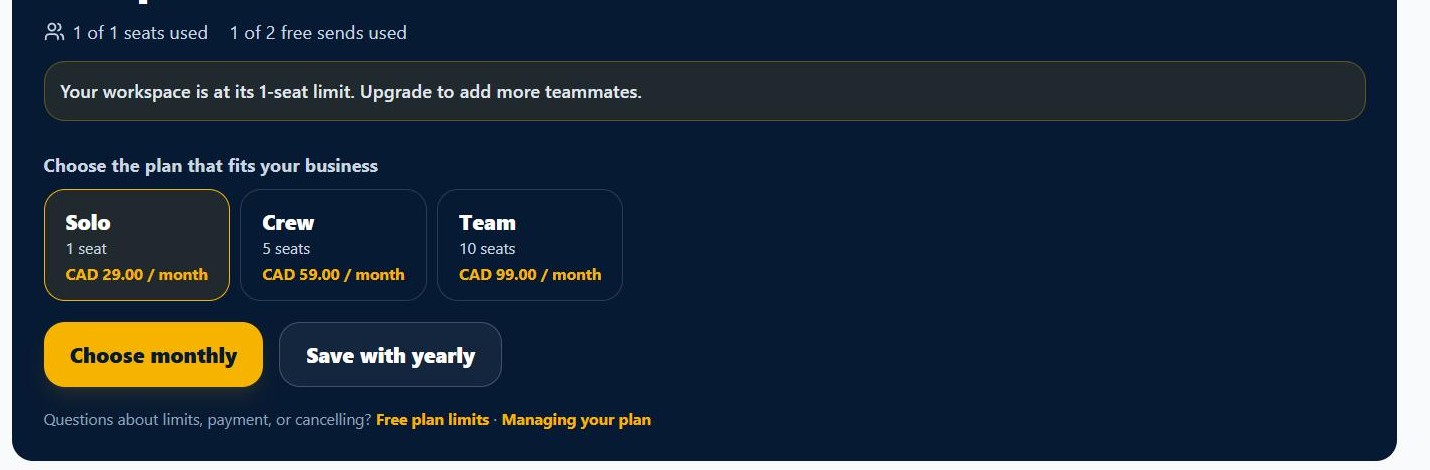
1. Start your plan
In Settings, pick the plan sized for your team (Solo, Crew, or Team), choose monthly or annual, and complete checkout on Stripe's secure page. There is no trial period -- checkout bills immediately, and access unlocks the moment Stripe confirms your payment to OuttaScope, not just when the checkout page says thanks.
2. Upgrade to a higher tier
If you already have an active Solo or Crew subscription, an Upgrade button on the Plan & Billing tab moves you straight to the next tier without cancelling and restarting. It takes effect immediately and you are charged the prorated difference right away, on the same billing date you already have.
3. Manage billing
The Manage billing button opens your Stripe billing portal: update the card, and see invoices and receipts. It also offers cancellation and, depending on how the portal is configured, switching between monthly and annual billing.
4. Cancel anytime
Cancelling in the billing portal stops renewal. Your access continues through the period you already paid for, then your workspace returns to the Free plan -- your records remain yours the whole time, and you can export them any time.
5. Reminder emails
OuttaScope sends occasional promotional nudges -- a reminder to capture your first extra if you have not yet, and a couple of "come back" emails if you go quiet on a paid plan. Turn those off any time with the Reminder emails button in Settings, or the one-click link in the footer of any reminder. Account emails about billing problems and your subscription confirmations always arrive; your account needs those.
What happens next
If a renewal payment ever fails, you get a grace period rather than a hard cutoff -- see subscription states.